General settings

Blog

تركي

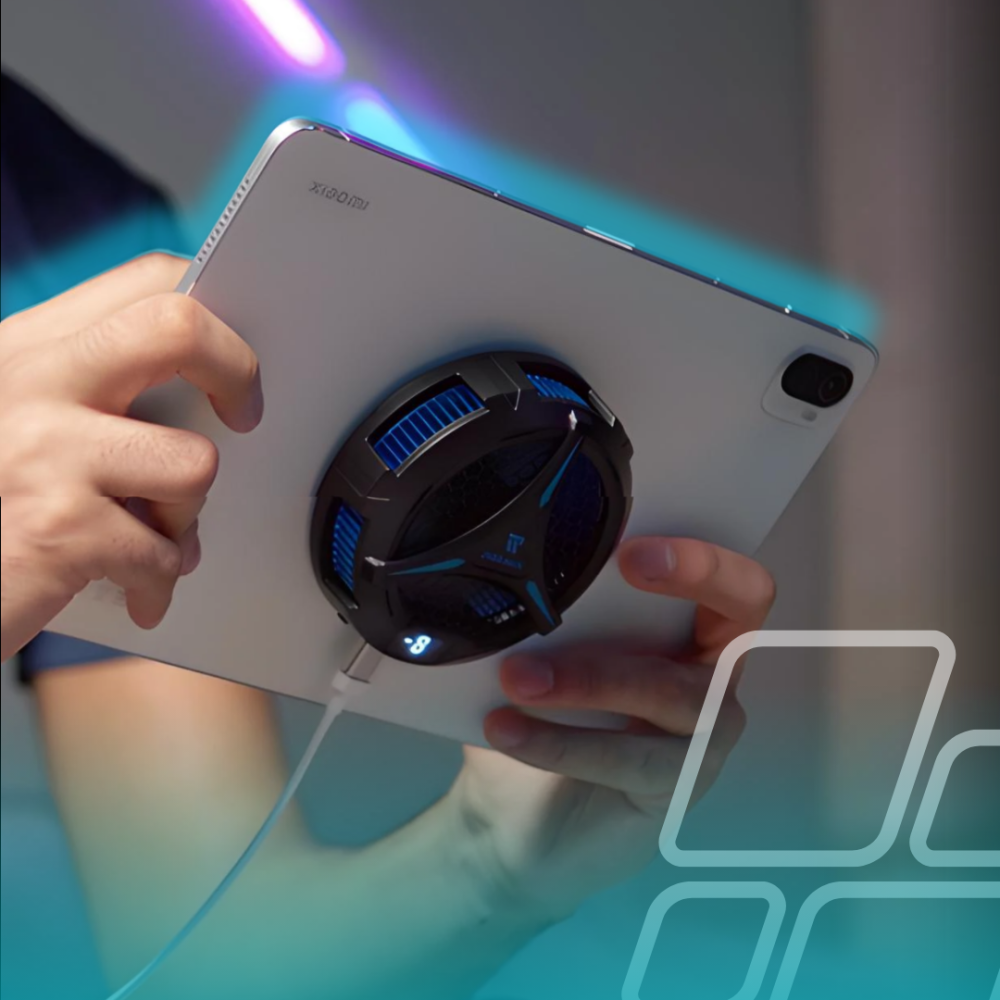
Why Are Phone and iPad Coolers So Important?
28 August 2025
تركي

Why Are Phone and iPad Coolers So Important?

مع ارتفاع حرارة المعالج عند تشغيل الألعاب أو التطبيقات الثقيلة أو التصوير الفيديو، قد ينخفض الأداء وتستهلك البطارية بسرعة. لذا، يأتي دور مبردات الجوال والآيباد في:

  • الحفاظ على درجات الحرارة المثالية.
  • تأخير استنزاف البطارية.
  • الحفاظ على سرعة وأداء الجهاز لفترة أطول.
  • تقليل مخاطر الاهتزاز الحراري وتأثيره على مكونات الجهاز.


كما ان المبرد له دور كبير في تقليل التقطيع او تاخير الاستجابه او تاخير الرسومات و اتصال الانترنت ايضا حيث ان الحراره العاليه تؤثر على اداء المعالج وينخفض اداءه بالاضافة لاستهلاك العمر الافتراضي للجهاز سواء كان الايباد او تابلت رد ماجيك .


اشهر المبردات

Premix Magnetic Cooler B10

  • تقنية تبريد مائي + تثبيت مغناطيسي (MagSafe).
  • أفضل خيار عام 2025 لأجهزة الآيفون والأندرويد.
  • لايناسب اجهزة iPad الكبيرة.

رابط الشراء


Black Shark Pro 4 Fan Cooler

  • المبرد الاقوى على الاطلاق حتى 2025
  • تطبيق للتحكم من الجوال و الايباد
  • تثبيت مغناطيسي او عبر القطع المرفقه

رابط الشراء


Premix B9X iPad Magnetic Cooling Fan

  • مزوّد بشاشة تعرض درجة الحرارة في الوقت الفعلي.
  • متوافق مع اجهزة الايباد و التابلت
  • مثالي لأجهزة iPad المتوسطة إلى الكبيرة.

رابط الشراء


FlyDigi B8X / B7X (للجوال)

  • أكثر المبردات شهره
  • يتميز بقوته وادائه العالي .
  • يعيبه ان بعض الاوقات يتعرض للاعطال بشكل سريع .
  • متوافق مع اجهزة الجوال

رابط الشراء


Black Shark FunCooler Series

  • FunCooler 5: تقنية تبريد Peltier تخفض درجة الحرارة حتى 0 مئوية.
  • FunCooler 2 Pro: تبريد مائي سريع، يحافظ على أداء رام الجهاز.


إذا كنت تبحث عن تبريد فعّال لحماية الآيباد أو الجوال أو الحفاظ على أداء جهازك في الألعاب، ستجد خيارات متعدده في قسم ملحقات الالعاب مصممة لتلبية احتياجاتك. سواء كان الأداء والتصميم أو التوافق مع مختلف الأجهزة، تجد الخيار الأمثل لديك بين هذه الموديلات.

Read More
How to Redeem Steam Cards
30 March 2026
تركي

How to Redeem Steam Cards

How to Redeem Your Steam Gift Card?

  1. Visit the Steam Website:
  2. Go to the official Steam store at [https://store.steampowered.com/]
  3. Log In or Sign Up:
  4. Sign in to your existing Steam account or create a new one.
  5. Access Your Wallet:
  6. Click on your Profile, then select View my wallet.
  7. Redeem Gift Card:
  8. Click on the option Redeem a Steam Gift Card or Wallet Code.
  9. Enter Your Code:
  10. Enter the Gift Voucher Code sent to you.
  11. Complete the Process:
  12. Click the Continue button.
  13. Success!
  14. Congratulations! The balance has been added to your account.

To buy a Steam card, click here


Read More
How to Redeem Your PUBG Mobile UC?
30 March 2026
تركي

How to Redeem Your PUBG Mobile UC?

How to Redeem Your PUBG Mobile UC?

Once you complete the purchase, you must redeem the voucher on the official PUBG website.

  1. Visit the official PUBG Midasbuy website:
  2. Go to [https://www.midasbuy.com]
  3. Log In or Sign Up:
  4. Click on Login/Create Account.
  5. Enter Player ID:
  6. Enter your PUBG account Player ID.
  7. Enter Voucher Code:
  8. Enter the card code sent to you.
  9. Check In-Game Mail:
  10. Find your rewards in your in-game mailbox.
  11. Success!
  12. Congratulations! The UC has been added to your account.


To buy PUBG UC, click here


Read More
Redeem Xbox Gift Card
30 March 2026
تركي

Redeem Xbox Gift Card

How to Redeem Your Xbox Gift Card?


Method 1: Via the official Xbox website:

Visit the redemption site at [redeem.microsoft.com]

Sign in to your account.

Enter the 25-character code and follow the on-screen instructions.


Method 2: Using Xbox 360:

Sign in to your Xbox 360 account (Ensure it's the account you want to use for the code).

Press the Xbox Guide button on your controller.

Select Games & Apps, then select Redeem Code.

Enter the 25-character code and follow the instructions.


Method 3: Using Xbox One, Xbox Series X, or Xbox Series S:

Sign in to your Xbox console.

Go to the Home screen, then open the Store app.

In the Store app, move the cursor left or press the View button to open the side menu.

From the menu, select Redeem.

Enter the 25-character code and follow the instructions.


Method 4: Using the Xbox app for Android and Windows 10:

Sign in to the Xbox app.

Tap the Menu button in the top-left corner.

Select Microsoft Store from the menu, then select Redeem a code.

Enter the 25-character code and follow the instructions.


Method 5: Using the Xbox app for iOS:

From your phone's browser, go to []

Sign in to your account.

Enter the 25-character code and follow the instructions.


To buy an Xbox card, click here


Read More
Redeem Nintendo Card
30 March 2026
تركي

Redeem Nintendo Card

Method 1: Via the official website:

  1. Visit the official Nintendo redemption site at [https://ec.nintendo.com/redeem]
  2. Sign in to your account or create a new one.
  3. Enter the 16-character code, then click Next.
  4. Re-enter your password if prompted.
  5. Success! The balance has been added to your account.


Method 2: Using the Nintendo Switch console:

  1. From the Home screen of your Nintendo device, select the Nintendo eShop icon.
  2. On the left side of the screen, scroll down to Enter Code.
  3. Enter the 16-character code, then click Next.
  4. Success! The balance has been added to your account.


  1. To buy a Nintendo card, click here


Read More
Redeem Kammelna Card
30 March 2026
تركي

Redeem Kammelna Card

How to Redeem Your Kammelna Card?

  1. Sign in to your account or create a new one at [https://kammelna.com/Home/Code]
  2. Click on "Store and Subscriptions" on the home page.
  3. Click on "Activate Subscription Code".
  4. Enter the voucher code in the activation field.


To buy a Kammelna card, click here

Read More