How to know your iPad model?

How to Easily Identify Your iPad Model?

If you own an iPad and want to know its model, release year, or compatible accessories, it’s much easier than you think!

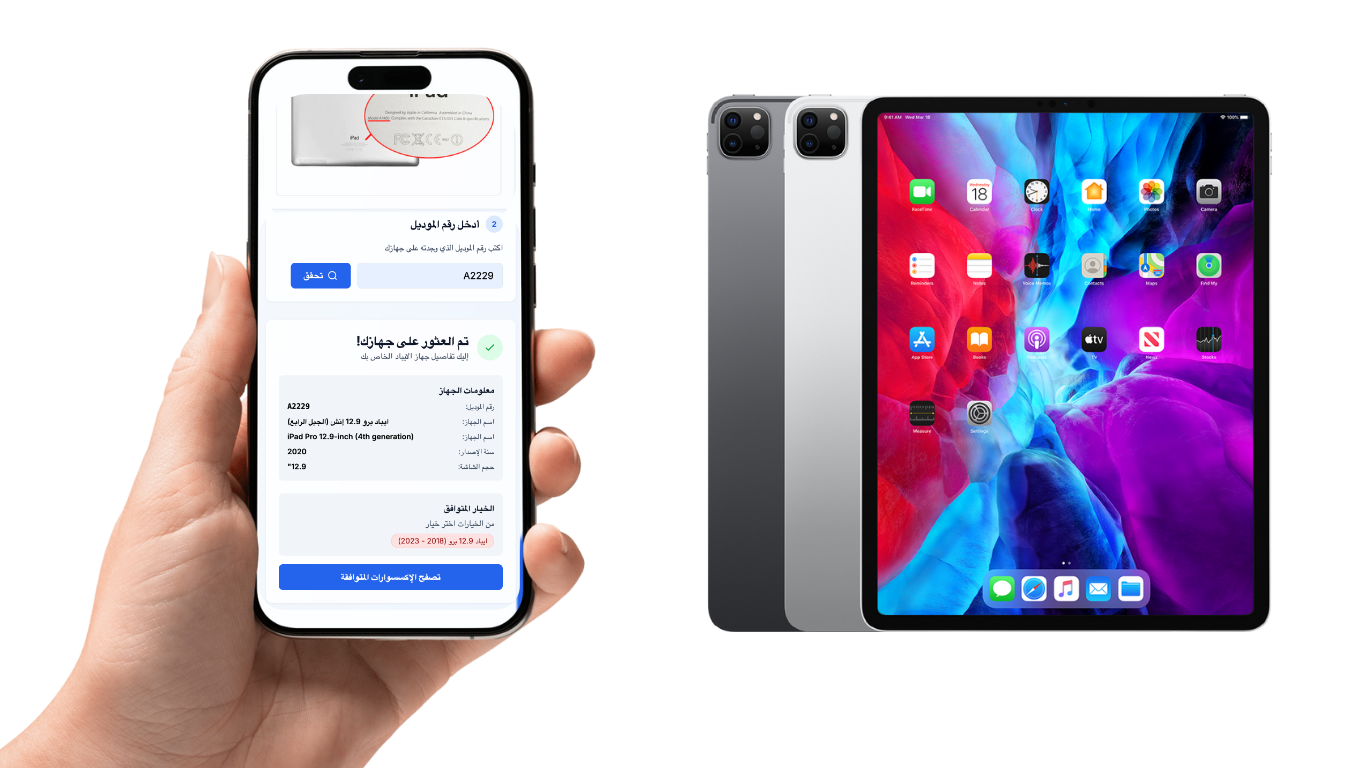
All you need is the model number found on the back of your device, written in a format like: A2432.


Step by Step Guide:

  1. Flip your iPad and look for the small number printed on the back next to the word Model.
  2. Enter this number on ipad.prem-box.com.
  3. Within seconds, you’ll see all the details about your device:
  • iPad model (e.g., iPad Pro or iPad Air).
  • Release year.
  • Compatible accessories (keyboard, protective case, headphones, and more).
Why Should You Know Your iPad Model?

  • To make sure you buy the right accessories for your device.
  • To check if your iPad supports the latest updates and software.
  • To avoid mistakes when purchasing incompatible products.

Conclusion

No need to be confused when shopping for a new keyboard or case. Simply visit ipad.prem-box.com, enter the model number from the back of your iPad, and get all the details instantly.



How to know your iPad model?

Related Articles

Redeem Razer Gold Card
30 March 2026
Ameen

Redeem Razer Gold Card

How to Redeem Your Razer Gold Card?

  1. Visit the Razer Gold website at [https://gold.razer.com/]
  2. Sign in to your Razer Gold account or create a new one.
  3. From the top menu, select Gold, then click Reload Now.
  4. Select Razer Gold PIN as your payment method.
  5. Enter the 14-character voucher code, then click Next.
  6. Success! The balance has been added to your account.


To buy a Razer Gold card, click here

Read More
Redeem Kammelna Card
30 March 2026
تركي

Redeem Kammelna Card

How to Redeem Your Kammelna Card?

  1. Sign in to your account or create a new one at [https://kammelna.com/Home/Code]
  2. Click on "Store and Subscriptions" on the home page.
  3. Click on "Activate Subscription Code".
  4. Enter the voucher code in the activation field.


To buy a Kammelna card, click here

Read More
Redeem Nintendo Card
30 March 2026
تركي

Redeem Nintendo Card

Method 1: Via the official website:

  1. Visit the official Nintendo redemption site at [https://ec.nintendo.com/redeem]
  2. Sign in to your account or create a new one.
  3. Enter the 16-character code, then click Next.
  4. Re-enter your password if prompted.
  5. Success! The balance has been added to your account.


Method 2: Using the Nintendo Switch console:

  1. From the Home screen of your Nintendo device, select the Nintendo eShop icon.
  2. On the left side of the screen, scroll down to Enter Code.
  3. Enter the 16-character code, then click Next.
  4. Success! The balance has been added to your account.


  1. To buy a Nintendo card, click here


Read More